Okay, I'm back and here's where I'm at:
It's actually been a while since I've been able to fully focus on motion capture for our productions again, so I had to refresh my memory on a few things. But first things first.
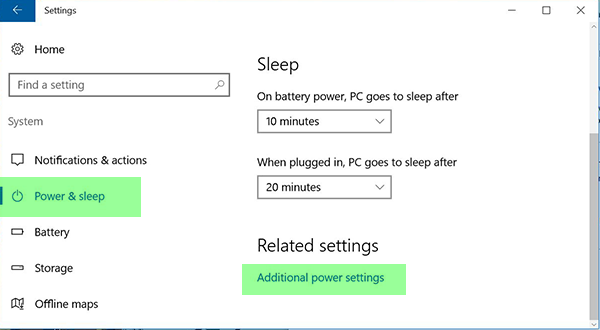
Regarding my daughter's laptop, I went into the Power options as shown here, and clicked on Additional Power Settings:
Attachment:
 1AdditionalPowerSettings.png [ 63.82 KiB | Viewed 35645 times ]
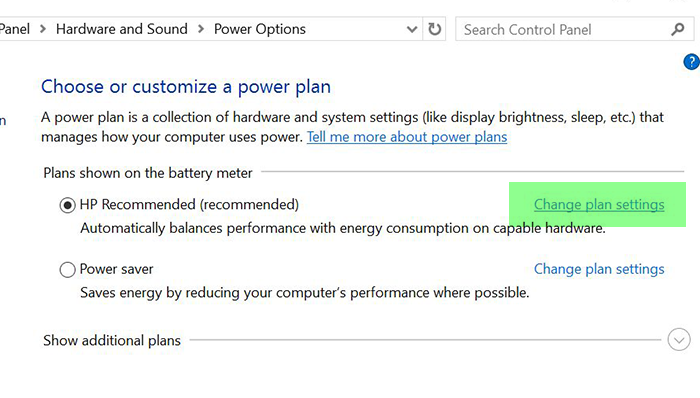
Which led me to here. This may look differently on yours depending on your computer's manufacturer. I clicked on Change Plan Settings:
Attachment:
 2ChangePlanSettings.png [ 179.55 KiB | Viewed 35645 times ]
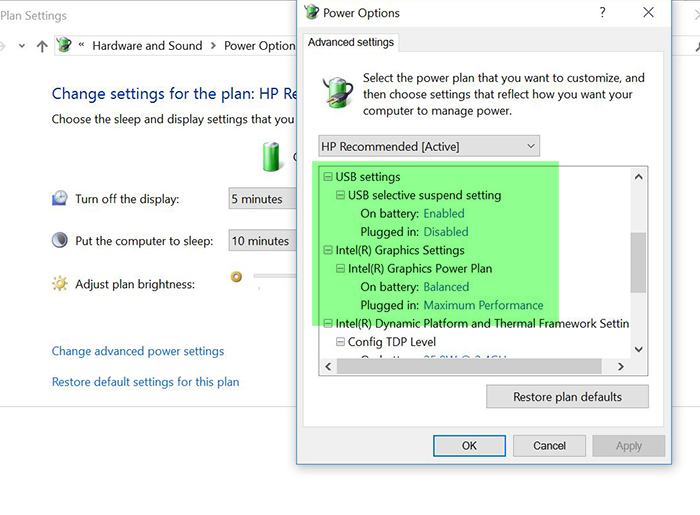
Which finally brought me here, where I found a handful of settings that I felt might improve the capture framerate for this computer, most notably the ones related to USB and Graphics performance:
Attachment:
 3AdvancedSettings.png [ 208.82 KiB | Viewed 35645 times ]
I think the exact settings are going to vary between computer model and hardware options so use your best judgement in changing these settings.
After making the changes and rebooting the computer, I was able to better maintain a steady 30 fps on this computer. TBH, it still seems to struggle just a little when sitting idle (occasionally drops to 29.4 fps) but then again this is a fairily low-end i5 laptop. (Tip: if you're shopping for a laptop or tablet to use with Kinect 2, make sure you get it with an i7 processor. Looking back, I really wish I had spent a little more money on this laptop. Oh, well...my daughter is very happy with it.) :)
Anyway, I think we're good with this computer for now but if anybody has other suggestions, please let me know.
Well, I'm off to do some triple Kinect 2 tests. I'll post a new thread if I learn or create anything interesting with this.


