| ipisoft.com https://forum.ipisoft.com/ |
|
| Psychadelic Kinect results in ipi and a video card question https://forum.ipisoft.com/viewtopic.php?f=6&t=5928 |
Page 1 of 1 |
| Author: | katt230 [ Wed Mar 28, 2012 4:16 pm ] |
| Post subject: | Psychadelic Kinect results in ipi and a video card question |
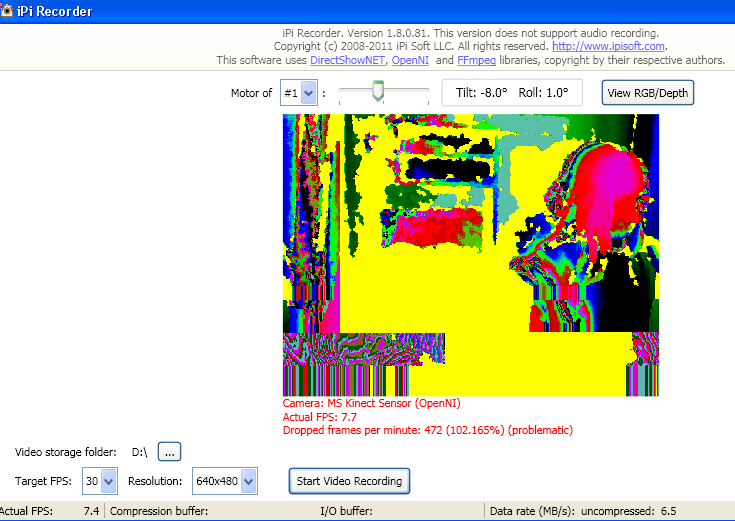
Hi, I was trying to use the trial version of ipiSoft, but am having some troubles with it. I want to use 1 Kinect for DAZ Studio animations on my 32-bit Windows XP PC. When I start ipiSoft, the camera area looks really colorful and is choppy (I'm the magenta and black thing on the right). The images captured by the Kinect jump around weird, like a pixelated, bad TV signal. ![]() I don't know what the problematic frame rate thing really means, either. Is my Kinect not set up right? When I was installing ipiSoft, it said, "NVIDIA GeForce 6100 does not support Shader Model 4.0" and that it needed a "DirectX 10-compatitble GPU." I know there's a list of which video cards to get, but I'm not sure about how to pick the right one (since maybe the captured images are caused by the wrong video card). I was thinking of getting an ATI Radeon HD 6850 because it seems cheap, but I think it would be slower when "rendering" the frames of the captured animation, right? Would it be better to get one that is closer or equal to 2.0 frames per second? My knowledge of computer hardware is really poor. |
|
| Author: | vmaslov [ Thu Mar 29, 2012 6:23 am ] |
| Post subject: | Re: Psychadelic Kinect results in ipi and a video card quest |
"Psychedelic" picture is an image from the depth sensor. It's just nice color palette used to display depth values. Try pressing "View RGB/Depth" button to see normal (color, RGB) camera image. "Problematic framerate" means you experince problems with performance of your hardware. The reason in that case (large number of dropped frames) is almost surely low USB bandwidth. And sure it's not videocard problem. Try connecting Kinect to different USB connectors on your PC. Actual FPS should be very close to target FPS (30 frames per second), ideally equal. Dropped frames should be very low, not more than 50 per minute, ideally zero. If it does not help, try to disable color picture at all - check "Don't record RGB from depth sensors" under "advanced settings" on "Camera Selector" dialog. Videocard's GPU is used when iPi Studio restores model animation from recorded video. General rule: more expensive videocards have higher performance, and less processing time per frame with iPi Studio. Exact time is determined by many factors besides videocard performance: number of cameras and frame resolution in recorded video, performance of main processor (CPU). For example, if processing time is 1s then 10 seconds video recorded @30fps will be processed in 300s (or 5 minutes). If you've got 2 times more powerful videocard, processing time should reduce about 2 times and processing completes in 2.5 minutes. |
|
| Author: | Curio [ Tue May 01, 2012 3:23 pm ] |
| Post subject: | Re: Psychadelic Kinect results in ipi and a video card quest |
I had this same issue while connecting 2 kinects and now it does it when I only use one. I've had to revert to recording on my laptop and processing on my desktop. If I "press "View RGB/Depth" button to see normal (color, RGB) camera image." Will it then record from the depth sensor properly? I've found it impossible to process the distorted videos so far. |
|
| Author: | vmaslov [ Mon May 14, 2012 12:08 am ] |
| Post subject: | Re: Psychadelic Kinect results in ipi and a video card quest |
Curio wrote: I had this same issue while connecting 2 kinects and now it does it when I only use one. I've had to revert to recording on my laptop and processing on my desktop. If I "press "View RGB/Depth" button to see normal (color, RGB) camera image." Will it then record from the depth sensor properly? I've found it impossible to process the distorted videos so far. Hi To resolve your issue, try following guidelines suggested in this topic http://forum.ipisoft.com/viewtopic.php?f=5&t=6030. View RGB/Depth button does not affect data being recorded, it just switches display mode. Unchecking Don't record RGB from depth sensors may help if your issue is related to low USB bandwidth. |
|
| Page 1 of 1 | All times are UTC - 8 hours [ DST ] |
| Powered by phpBB® Forum Software © phpBB Group http://www.phpbb.com/ |
|