I re-tracked the crouching and sitting tests following my tips described above and achieved very good results.
To recap, users need to deactivate Shoulder Tracking to get good shoulder tracking results. I know that sounds weird but Shoulder Tracking is actually
enabled when it's
disabled, and when you
enable it works
incorrectly. There is currently no way to actually disable Shoulder Tracking, but that shouldn't be a problem because Shoulder Tracking actually works quite well when it's disabled.
Make sense? Good! :)
And here's a bonus: disabling Shoulder Tracking also appears to correct the spine and hips issue. You may see the spine attempting to bend during tracking but the spine will right itself when the calculation is done. My guess is that the tracking system is fighting against a bug with the rig or collision system, but disabling Shoulder Tracking apparently allows it to override this conflict.
I still found I had to make a few corrects that should not have been necessary but the new edit tools made this process fairly painless to manage.
Another important tip: the Actor needs to be several centimeters shorter than the live performer for tracking to work correctly when going into crouching or sitting positions. My height is about 1.67 meters but I had to reduce the Actor to 1.55 meters for proper crouching and sitting motions.
Here's a screen cap from the 'crouching' test. Notice that the spine and hips now look symmetrical. With Shoulder Tracking deactivated, this pose tracked correctly with no extra tweaking required.
Attachment:
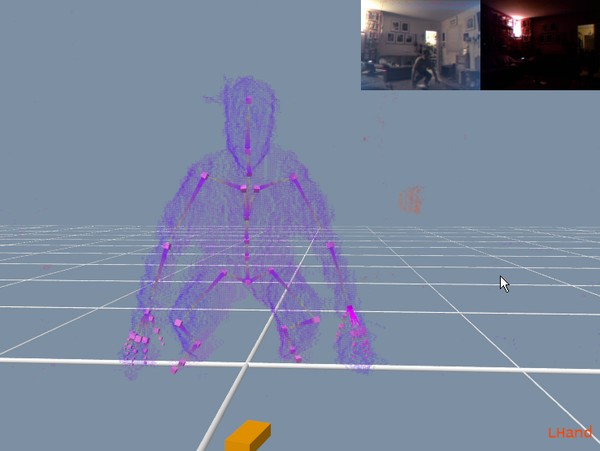 2013-02-01_163320.jpg [ 36.75 KiB | Viewed 19013 times ]
Remember, these tips are intended to be 'workarounds' for issues in the current build (2.2.1.145), and they will hopefully become obsolete in a future release of iPi Mocap Studio 2.0.
I'll post videos of the results tonight with comments on our YouTube channel.
Happy tracking!
G.


