Change font size
It is currently Mon Jun 29, 2026 10:38 am


Forum lockedPost a reply Page 6 of 10   [ 100 posts ]
Go to page Previous  1 ... 3, 4, 5, 6, 7, 8, 9, 10  Next
Author Message
PostPosted: Fri Feb 01, 2013 1:30 pm 

Joined: Mon Aug 03, 2009 1:34 pm
Posts: 2423
Location: Los Angeles
The new copy and past modes (bone and child, etc.,) and paste in ROI is making it much easier to fix some of these arm errors than I expected. Thumbs up, Team iPi! :)

G.

_________________
Greenlaw
Artist/Partner - Little Green Dog | My Demo Reels (2013,) (2015,) (2017,) and (2019)
Image
Watch a one minute excerpt on Vimeo now!


Top
 Profile  
 
PostPosted: Fri Feb 01, 2013 5:38 pm 

Joined: Mon Aug 03, 2009 1:34 pm
Posts: 2423
Location: Los Angeles
I re-tracked the crouching and sitting tests following my tips described above and achieved very good results.

To recap, users need to deactivate Shoulder Tracking to get good shoulder tracking results. I know that sounds weird but Shoulder Tracking is actually enabled when it's disabled, and when you enable it works incorrectly. There is currently no way to actually disable Shoulder Tracking, but that shouldn't be a problem because Shoulder Tracking actually works quite well when it's disabled.

Make sense? Good! :)

And here's a bonus: disabling Shoulder Tracking also appears to correct the spine and hips issue. You may see the spine attempting to bend during tracking but the spine will right itself when the calculation is done. My guess is that the tracking system is fighting against a bug with the rig or collision system, but disabling Shoulder Tracking apparently allows it to override this conflict.

I still found I had to make a few corrects that should not have been necessary but the new edit tools made this process fairly painless to manage.

Another important tip: the Actor needs to be several centimeters shorter than the live performer for tracking to work correctly when going into crouching or sitting positions. My height is about 1.67 meters but I had to reduce the Actor to 1.55 meters for proper crouching and sitting motions.

Here's a screen cap from the 'crouching' test. Notice that the spine and hips now look symmetrical. With Shoulder Tracking deactivated, this pose tracked correctly with no extra tweaking required.

Attachment:
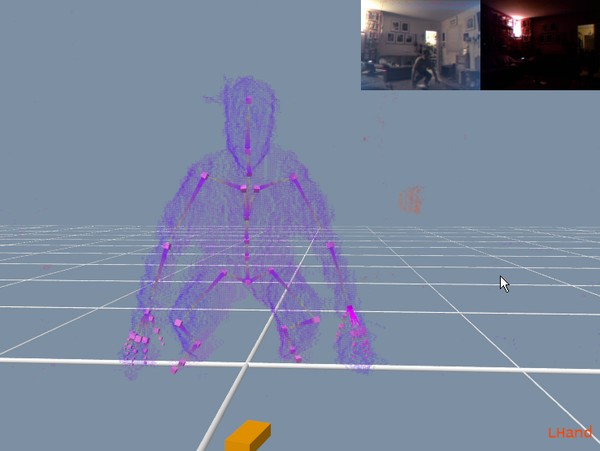
2013-02-01_163320.jpg
2013-02-01_163320.jpg [ 36.75 KiB | Viewed 17825 times ]


Remember, these tips are intended to be 'workarounds' for issues in the current build (2.2.1.145), and they will hopefully become obsolete in a future release of iPi Mocap Studio 2.0.

I'll post videos of the results tonight with comments on our YouTube channel.

Happy tracking!

G.

_________________
Greenlaw
Artist/Partner - Little Green Dog | My Demo Reels (2013,) (2015,) (2017,) and (2019)
Image
Watch a one minute excerpt on Vimeo now!


Top
 Profile  
 
PostPosted: Sat Feb 02, 2013 4:19 am 

Joined: Mon Aug 03, 2009 1:34 pm
Posts: 2423
Location: Los Angeles
Sorry, I slept longer than intended. But after looking at the results with a fresher eye, I see I need to make some fixes anyway.

Greenlaw wrote:
Another important tip: the Actor needs to be several centimeters shorter than the live performer for tracking to work correctly when going into crouching or sitting positions. My height is about 1.67 meters but I had to reduce the Actor to 1.55 meters for proper crouching and sitting motions.

I should have checked this a little more closely before posting that info. Shortening the Actor does indeed allow it to capture the 'low crouch' far more accurately but, as mentioned earlier, shortening the Actor below actual height may also degrade accuracy in other areas of tracking.

In the case of the crouch test, it improved the crouch considerably but it significantly reduces feet stability when the Actor is standing fully upright.

I think I need to find a threshold closer to my actual height that won't lose the crouch, and then I need to just accept any feet instability that remains--the feet issue can be fixed in Motion Builder much more easily than the crouch errors that occur when the Actor is set to actual height of the performer.

I don't recall capturing a crouch pose being so problematic back in 1.0 but since I still have that version installed, I can go back to it sometime later this week and run a similar test for comparison.

Anyway, the spine problem seems to be gone for now--but it will probably return if I make the actor a little taller again. More later.

G.

_________________
Greenlaw
Artist/Partner - Little Green Dog | My Demo Reels (2013,) (2015,) (2017,) and (2019)
Image
Watch a one minute excerpt on Vimeo now!


Last edited by Greenlaw on Sat Feb 02, 2013 4:48 am, edited 1 time in total.

Top
 Profile  
 
PostPosted: Sat Feb 02, 2013 4:48 am 

Joined: Mon Aug 03, 2009 1:34 pm
Posts: 2423
Location: Los Angeles
Oh, I just realized--the Body Mass Index was set a little higher in the case--I must have forgotten to set this or load my own Actor preset. Reducing the BMI also helps a bit in this situation.

So, I reduced the BMI, gave the Actor a little more height (added about 3 cm) for the range of frames where the actor is standing and then re-ran Tracking and Jitter Removal with strongest Legs settings for that same range. Generally, it's not a good idea to change your Actor height in mid-Tracking but in this case I have no choice.

The results looks better now--feet stability is still less accurate than what I've come to expect from for iPi Mocap Studio but it significantly much better than what I was seeing earlier with the shorter Actor in the standing position. Not surprisingly, there is a little weirdness with the feet during the transition to crouching caused by using the different Actor height--the feet slide back a little as the Actor crouches. I think I can minimize this by re-tracking part of the transition but this error will probably be easier to fix in Motion Builder.

Alisa tells me that I'm being too obsessive--this is just a test file after all, and we don't actually need this particular motion for our current movie. She's right of course. :p

I should leave these test cases alone for now and re-visit them when the build with the fix is released. If I can make time tomorrow, I will still try post videos though.

G.

_________________
Greenlaw
Artist/Partner - Little Green Dog | My Demo Reels (2013,) (2015,) (2017,) and (2019)
Image
Watch a one minute excerpt on Vimeo now!


Top
 Profile  
 
PostPosted: Sat Feb 02, 2013 11:44 am 

Joined: Mon Aug 03, 2009 1:34 pm
Posts: 2423
Location: Los Angeles
Here's another tip. I know, I know, but I couldn't resist--had to try one more thing with the Crouching Test project.

This requires tracking with Enable Shoulder Tracking disabled which, as mentioned previously, will still give you should tracking but it eliminates the right shoulder issues and helps minimize or eliminate the spine problem in a crouch.

After tracking the crouch using the shorter Actor to allow accurate tracking, I found that if I go to the lowest point of the crouch, I could increase the height of the Actor, click Refit Pose, and have it fit that pose at closer to the actual height of the actor. Do this with gradual increases in the height--the idea is to get as close to actual height or slightly taller if possible while holding that pose.

BTW, even though iPi Mocap Studio supports multiple Undos, it's probably a good idea to save an iteration your project before you start scaling up the rig, just in case things get messy.

Now, Track Backwards through the pose transition. Chances are, it will fail if your rig is too tall for this. I was able to bring the rig back up to my actual height of 1.67 meters and hold the pose at the ground, but this failed about halfway through the transition. However, when I moved back to my start frame, scaled down to 1.65 meters (slightly shorter,) clicked Refit Pose and Track Backwards, I got a successful result.

You'll probably want to stop Tracking before the actor reaches the full standing position because if the Actor is too short, the feet may float off the ground. From here, you may want to move back a 'standing pose' frame where the Actor was at it's full actual height when you originally tracked the scene, return the Actor to that height, and track forward.

You can optionally use Refine from the low pose to the High in either direction--in this situation, this feature may make bumps better or worse, so save the project before using it.

When you're done, run an appropriate amount of Jitter Removal through all of the changed frames. Don't forget to bump Trajectory Filtering to smooth transition between the JR changes.

The result should be a nice transition into the crouching pose with no weird leg pops or sideways curling spines.

To go forward from crouch to standing, simply start the same process from the lowest point of the crouch forward, and transition to the 'full' height actor at the end.

So the general 'workaround' rules for the current build (2.2.1.145) are:

1. Deactivate Enable Shoulder Tracking.
2. Actor needs to be full height when in standing pose to prevent 'floating feet' and other issues.
3. Actor needs to be shorter than normal height to achieve sitting and crouching poses.
4. To blend the transition between the different height settings, it's better to re-track the motion with the short Actor, slightly scaled up, from the crouching/sitting pose to standing pose because tracking with an actual size Actor from standing pose to crouching/sitting pose is very likely to result the curving spine problem.
5. Practice--you'll soon get a feel for how far you can push the scale and still maintain accurate results.

BTW, if the character is sitting down on a chair, this 'scaling trick' should work more easily because that pose is not as extreme as the full crouch.

Okay, time for me to move on--all I really wanted was correct shoulder tracking for Brudders and we now have a workaround for that.

Happy tracking everybody! :)

G.

_________________
Greenlaw
Artist/Partner - Little Green Dog | My Demo Reels (2013,) (2015,) (2017,) and (2019)
Image
Watch a one minute excerpt on Vimeo now!


Top
 Profile  
 
PostPosted: Sat Feb 02, 2013 4:46 pm 

Joined: Mon Aug 03, 2009 1:34 pm
Posts: 2423
Location: Los Angeles
I kept noticing the feet sliding backwards during the crouch so I decided to take a closer look at the cause:
Attachment:
FeetShift.jpg
FeetShift.jpg [ 80.18 KiB | Viewed 17806 times ]

This is related to the 'Feet Clipping' issue reported elsewhere in these forums. Because iPi Mocap Studio 2 is clipping most of the performer's feet at the ground plane, there is very room for the Actor's feet inside the performer's feet. This causes the Actor's feet to be pushed out past the ankles several inches from where they should be.

Because I am using a 'front facing' configuration for the Kinects here, this at least allows the feet to move somewhere--backwards in this case. If I was using the 180 degree configuration, we might actually see more tracking errors with the feet because of a tightly confining space surrounding the ankles. This may also increase the chances of the sideways bending spine and hips problem to occur.

One possible workaround for this issue: have the performer wear large boots that increase the height and volume of his feet, providing the iPi Actor's feet a little more 'breathing space'. (I'll test this idea this tonight.)

In a future build, could the ground plane be lowered so that it doesn't clip so much of the feet and legs when the actor is close to the floor? This same feet clipping issue also caused a lot of problems for the 'Three Happy Cats' test data last year.

Even better, it might be helpful if the user was allowed to move the ground plane up or down to where it best suited his data or be allowed to shift the point cloud up or down.

Thanks for listening guys! :)

G.

_________________
Greenlaw
Artist/Partner - Little Green Dog | My Demo Reels (2013,) (2015,) (2017,) and (2019)
Image
Watch a one minute excerpt on Vimeo now!


Top
 Profile  
 
PostPosted: Sun Feb 03, 2013 5:22 am 

Joined: Wed Oct 10, 2012 3:17 am
Posts: 84
I have to admit, a simple ground plane movement outside of the tweaking you can do in calibration would be helpful. Well in theory it would be, I think we would have to try it out first.

Oli


Top
 Profile  
 
PostPosted: Sun Feb 03, 2013 7:14 am 

Joined: Mon Aug 03, 2009 1:34 pm
Posts: 2423
Location: Los Angeles
ManyMotion wrote:
... Well in theory it would be, I think we would have to try it out first.

Yes, and admittedly, it's only a layman's theory at best. :)

Obviously I don't understand all the inner workings of iPi Mocap Studio and there may be ramifications for lowering the ground collision plane or raising the cloud that I'm not aware of. But right now, I'm willing to try anything. In situations like the above, the currently locked Y-positioning of the ground and/or cloud at least appears to be fighting the rig more than helping.

Anyway, this is another issue that doesn't actually affect our current production but it has been something that frustrates me from time to time during R&D and it will likely affect our future productions.

G.

_________________
Greenlaw
Artist/Partner - Little Green Dog | My Demo Reels (2013,) (2015,) (2017,) and (2019)
Image
Watch a one minute excerpt on Vimeo now!


Top
 Profile  
 
PostPosted: Mon Feb 04, 2013 1:49 am 
iPi Soft

Joined: Wed Jan 11, 2012 6:12 am
Posts: 2355
Location: Moscow, Russia
Hi, Greenlaw

We will try to address clipping of near ground parts of the actor (generally, the feet) in future releases using the color information from Kinect. Currently, this issue takes place during background subtraction logic, as the foot standing on the floor does not have much depth difference with the floor itself (which is the background). Especially when the direction in which the sensor is looking at it is less horizontal, or the distance to the actor is far.
Using more bulky shoes (or with thicker sole) may help.


Top
 Profile  
 
PostPosted: Mon Feb 04, 2013 2:29 am 

Joined: Mon Aug 03, 2009 1:34 pm
Posts: 2423
Location: Los Angeles
Thanks for confirming some of the above issues and the very helpful explanations. I meant to test this but I caught a cold this weekend--ugh. Not sleeping very much last week probably didn't help either.

But tomorrow, bulky shoes it is then. :)

G.

_________________
Greenlaw
Artist/Partner - Little Green Dog | My Demo Reels (2013,) (2015,) (2017,) and (2019)
Image
Watch a one minute excerpt on Vimeo now!


Top
 Profile  
 
Display posts from previous:  Sort by  
Forum lockedPost a reply Page 6 of 10   [ 100 posts ]
Go to page Previous  1 ... 3, 4, 5, 6, 7, 8, 9, 10  Next


Who is online

Users browsing this forum: No registered users and 26 guests


You cannot post new topics in this forum
You cannot reply to topics in this forum
You cannot edit your posts in this forum
You cannot delete your posts in this forum
You cannot post attachments in this forum

Search for:
Jump to:  


Powered by phpBB® Forum Software © phpBB Group
610nm Style by Daniel St. Jules of Gamexe.net
