Hello,
I have just started playing around with iPi Mocap Studio in conjunction with 2 Kinect for XBox sensors, and I'm having a hard time getting calibration right. One of my problems is that the software thinks my cameras are 180 degrees apart, whereas in reality I'm using a 60-80 degree setup. The documentation says I can change this in the "Calibration" tab via the "Depth Sensors Arrangement" options. However, these buttons seem to be missing in my version of the software. All I see in the "Calibration" tab is the "Calibrate Based on 3D Plane" button, as shown in this screenshot:
Attachment:
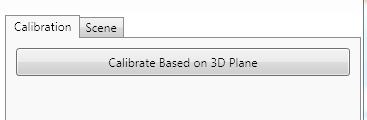 CalibrateTab.JPG [ 12.45 KiB | Viewed 9972 times ]
How can I inform the software about what setup I'm really using? I have version 2.3.1.149 (Basic Edition).
Thanks,
Joel


