Change font size
It is currently Tue Jun 30, 2026 5:59 am


Post a new topicPost a reply Page 1 of 1   [ 3 posts ]
Author Message
PostPosted: Sun Apr 21, 2013 4:49 am 

Joined: Sun Apr 21, 2013 4:34 am
Posts: 2
Hello,

I have just started playing around with iPi Mocap Studio in conjunction with 2 Kinect for XBox sensors, and I'm having a hard time getting calibration right. One of my problems is that the software thinks my cameras are 180 degrees apart, whereas in reality I'm using a 60-80 degree setup. The documentation says I can change this in the "Calibration" tab via the "Depth Sensors Arrangement" options. However, these buttons seem to be missing in my version of the software. All I see in the "Calibration" tab is the "Calibrate Based on 3D Plane" button, as shown in this screenshot:

Attachment:
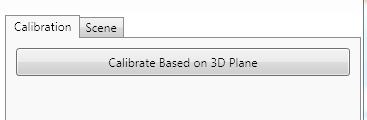
CalibrateTab.JPG
CalibrateTab.JPG [ 12.45 KiB | Viewed 9710 times ]


How can I inform the software about what setup I'm really using? I have version 2.3.1.149 (Basic Edition).

Thanks,

Joel


Top
 Profile  
 
PostPosted: Mon Apr 22, 2013 12:40 am 
iPi Soft

Joined: Wed Jan 11, 2012 6:12 am
Posts: 2355
Location: Moscow, Russia
Hi, Obiwan
The sensor positions are detected automatically now.
The documentation that comes with the software (under Help > User Guides menu) is a bit outdated. Sorry for that. It's a bunch of work to prepare these "offline" docs, so we do not do this on each release. An up-to-date info is maintained in our wiki. Here is the link for dual-Kinect calibration section:
http://wiki.ipisoft.com/User_Guide_for_Dual_Depth_Sensor_Configuration#Calibration
The main thing for proper autodetection of angle between the sensors is moving the calibration board considerably, at least in 0.5m range, both back and forth and side to side.


Top
 Profile  
 
PostPosted: Tue Apr 23, 2013 12:49 pm 

Joined: Sun Apr 21, 2013 4:34 am
Posts: 2
@vmaslov: Thanks for the link and the calibration hint, I'll keep this in mind for my next calibration.

@eyepies: Great, many thanks, this little trick did indeed solve my problem! After the second calibration, my camera positions are now recognized correctly, yay :)

Cheers,

Joel


Top
 Profile  
 
Display posts from previous:  Sort by  
Post a new topicPost a reply Page 1 of 1   [ 3 posts ]


Who is online

Users browsing this forum: No registered users and 10 guests


You cannot post new topics in this forum
You cannot reply to topics in this forum
You cannot edit your posts in this forum
You cannot delete your posts in this forum
You cannot post attachments in this forum

Search for:
Jump to:  


Powered by phpBB® Forum Software © phpBB Group
610nm Style by Daniel St. Jules of Gamexe.net