Change font size
It is currently Tue Jun 30, 2026 1:23 am


Post a new topicPost a reply Page 1 of 1   [ 8 posts ]
Author Message
PostPosted: Thu Mar 21, 2013 2:30 pm 

Joined: Thu Feb 28, 2013 7:19 am
Posts: 10
Hi All,

I'm ready to tear some hair out......was hoping someone might be able to give me a pointer or two.

We've gor the latest iPi software, six SONY PS cameras, a fast PC/graphics with 12GB RAM......

When we set up, we're getting 640x480 video at 40fps. We've tried leaving the background brightness at normal, dark, and darkest. When the camera is reading the video back, it appears that at least 4 of the cameras are tracking the light used for calibration. We stop for 3-4 seconds at each corner on the floor while doing the floor and again when 'drawing' the verticle lines from the upper part of our box to the floor.

When the system is finished, (after about 20 minutes), we don't have a box and it looks like tow of the floor lines are not being displayed.

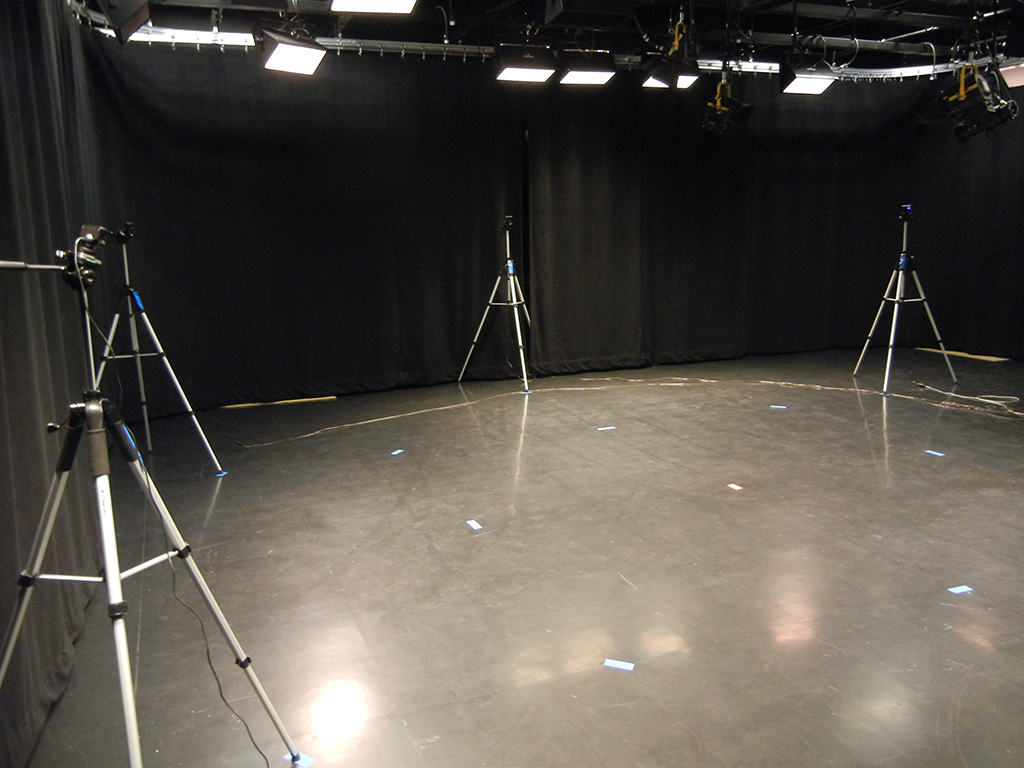
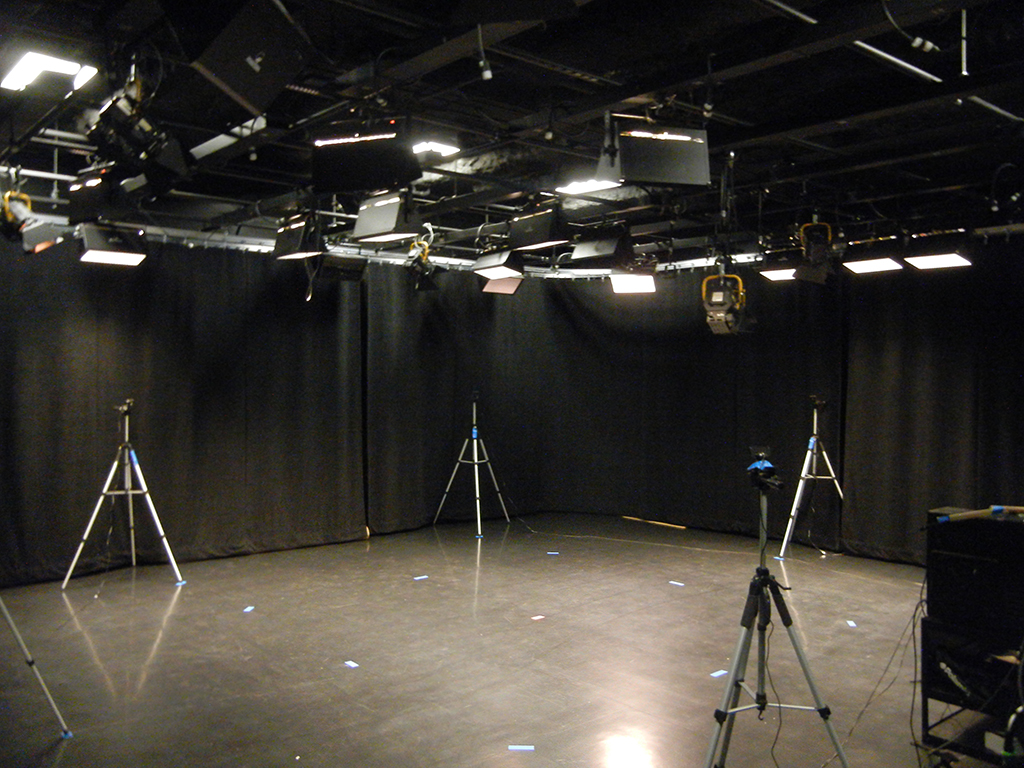
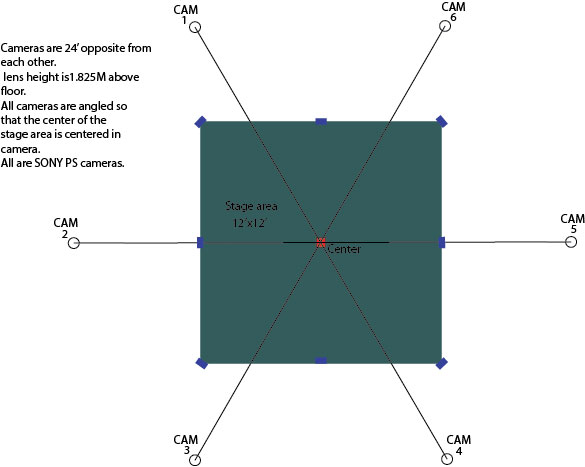
I've attached a diagram and photo of uor setup. Suggestions are certainly welcome, if you're in the Denver area, you're welcome to visit.....

Thanks.


Attachments:
Picture 002.jpg
Picture 002.jpg [ 528.95 KiB | Viewed 14894 times ]
Picture 001.jpg
Picture 001.jpg [ 692.83 KiB | Viewed 14894 times ]
Setup.jpg
Setup.jpg [ 42.95 KiB | Viewed 14894 times ]
Top
 Profile  
 
PostPosted: Fri Mar 22, 2013 12:54 am 
iPi Soft

Joined: Wed Jan 11, 2012 6:12 am
Posts: 2355
Location: Moscow, Russia
First, from the mocap accuracy perspective, I recommend to set cameras at different height to get better coverage of the actor: not only from the side, but also from the top and near the feet.

Next, to have a better look of the problems you are experiencing with calibration, please provide one of your calibration videos.


Top
 Profile  
 
PostPosted: Fri Mar 22, 2013 5:44 am 

Joined: Thu Feb 28, 2013 7:19 am
Posts: 10
I'll vary the height and if it still doesn't work, will provide a copy. Any suggestions as to which cams should be at what height?


Top
 Profile  
 
PostPosted: Fri Mar 22, 2013 6:04 am 
iPi Soft

Joined: Wed Jan 11, 2012 6:12 am
Posts: 2355
Location: Moscow, Russia
Varying camera heights will barely improve your calibration. It just wanted to note that usually it helps for action tracking. I suggest having two cameras at higher height (2.5 - 3m), and one at lower height (about 1m). Two high cameras should not be neighbor or opposite. For example, 2 & 6 - higher, and 4 - lower.


Top
 Profile  
 
PostPosted: Fri Mar 22, 2013 6:21 am 
iPi Soft

Joined: Wed Jan 11, 2012 6:12 am
Posts: 2355
Location: Moscow, Russia
Have you tried to disable "Auto detect initial camera positon"? With your setup, you can just reset camera positions with "Full Circle" standard pattern and start calibration.
What is your typical marker misdetection rate? You can see it in the "Scene" tab after the marker detection phase is completed. Click on "Camera X" buttons in toolbar to see value for corresponding camera. The values larger than 20% are considered bad.


Top
 Profile  
 
PostPosted: Fri Mar 22, 2013 6:30 am 

Joined: Thu Feb 28, 2013 7:19 am
Posts: 10
Yes, we've tried disabling both auto sensing boxes. Not sure about the mis detection rate, we're going to try again later this morning and I'll note the rate.

Cheers


Top
 Profile  
 
PostPosted: Fri Mar 22, 2013 9:56 am 

Joined: Wed Jan 09, 2013 5:09 am
Posts: 47
Hi,

Do your cameras appear in the right order in iPi Recorder? You can drag-and-drop them so that camera 1 appears in at first place, camera 2 at the second, etc... That's a mistake I have already made, and as far I can remember, calibration failed.


Top
 Profile  
 
PostPosted: Fri Mar 22, 2013 12:45 pm 

Joined: Mon Aug 03, 2009 1:34 pm
Posts: 2423
Location: Los Angeles
That floor is very shiny and reflective. I don't know if it's contributing to your calibration problem but in my personal experience, a shiny floor can confuse the tracker because it may see a double image and a lot of extra motion--this was especially a problem when identifying ground points.

In my opinion, you should avoid shiny reflective surfaces as much as possible, whether you use PS3 Eye or Kinect.

G.

_________________
Greenlaw
Artist/Partner - Little Green Dog | My Demo Reels (2013,) (2015,) (2017,) and (2019)
Image
Watch a one minute excerpt on Vimeo now!


Top
 Profile  
 
Display posts from previous:  Sort by  
Post a new topicPost a reply Page 1 of 1   [ 8 posts ]


Who is online

Users browsing this forum: Google [Bot] and 9 guests


You cannot post new topics in this forum
You cannot reply to topics in this forum
You cannot edit your posts in this forum
You cannot delete your posts in this forum
You cannot post attachments in this forum

Search for:
Jump to:  


Powered by phpBB® Forum Software © phpBB Group
610nm Style by Daniel St. Jules of Gamexe.net