Change font size
It is currently Mon Jul 27, 2026 11:45 pm


Post a new topicPost a reply Page 1 of 1   [ 5 posts ]
Author Message
PostPosted: Mon Oct 28, 2013 5:48 pm 

Joined: Sun Oct 27, 2013 6:48 am
Posts: 8
Hi there, first post.

I will shortly be purchasing a standard license for iPi Soft Mocap Studio for use with an 8 PS3 Eye + Motion Controllers setup.

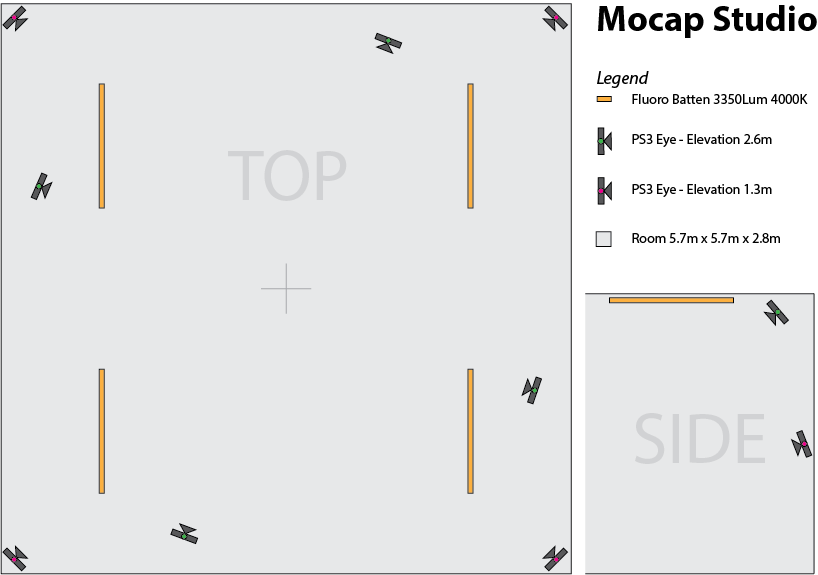
Based on my reading of the docs, wiki, etc I have come up with the following layout to suit the space I have and was wondering if anyone could shed some light on whether or not this is useful layout or if I have completely misinterpreted the information I have been reading.

Attachment:
8Cam-Studio-Layout.png
8Cam-Studio-Layout.png [ 24.08 KiB | Viewed 11879 times ]


Lights have been positioned so as to hopefully reduce both floor and wall shadows as much as possible. The apparently odd arrangement of the high cameras is to avoid beams on the ceiling.

For recording I will be using a 2009 Mac Pro (2 x 2.66GHz Quad-Core Xeon, 12 GB RAM) with 2 additional USB 3 cards for a total of 4 USB 2.0 capable controllers in system. Motion controllers will be Playstation Move's which I have already successfully paired via bluetooth under Windows 7 using the Mac's built in Bluetooth module. All up I would likely be using a max of 6 Moves at one time.

Recording will be done initially to a 6GB RAM Disk. Out of curiosity do you think compressed recording would be possible with this amount of CPU power?

Processing of the recorded footage will be done on a PC (i7-3820, 16GB RAM, Radeon HD7950 3GB).

So is this workable?


Top
 Profile  
 
PostPosted: Wed Oct 30, 2013 6:20 am 
iPi Soft

Joined: Wed Jan 11, 2012 6:12 am
Posts: 2355
Location: Moscow, Russia
Hi

The camera placement you propose seems OK, but the room size is a bit small. For an actor to be fully visible in PS Eye camera, he must be at least 1.5m away from it. So, the effective capture area in this room will be no more than 2x2m.

The recording hardware is adequate. I think it should be capable of "background subtraction" compression. However, to avoid framedrop issues (and to reduce records size), it may be worth to record at lower frame rate (50 fps). Be aware that storage usage is about 140Mb/s for uncompressed 8 cameras @60fps (for "background subtraction" compression it's generally 3 times less). So 6Gb RAM drive may be insufficient.

I don't know the specs of Mac BT module, but for stable work of PS Moves at a distance for BT adapter, it should be Class 2 or Class 1 device. So, if you'll see noticeable delays in PS Move data, then you may consider getting an USB Bluetooth adapter like ASUS USB-BT211 or Trendnet TBW-106UB/TBW-107UB.
Also note that we still had not tested more than 4 PS Moves. It may be required to use 2 BT adapters to get 6 PS Moves connected. And to use 2 BT adapters simultaneously, you'll need to bother with installing Motion in Joy BT drivers.


Top
 Profile  
 
PostPosted: Wed Oct 30, 2013 3:55 pm 

Joined: Sun Oct 27, 2013 6:48 am
Posts: 8
Thanks for the response vmaslov.

Please see the attached revision. If I stack the cameras like this and keep the elevations the same I see more like a 3mx3m capture area in this space when the 75deg FOV of the cameras in wide angle mode is considered. The elevation, and therefore angle, of the high cameras should mean they can be closer to the capture zone, laterally without negatively impacting on the space. Am I missing anything obvious here or do you agree?

Attachment:
8Cam-Studio-Layout-2.png
8Cam-Studio-Layout-2.png [ 35.72 KiB | Viewed 11852 times ]


I guess on the recording front I won't really know if compression is viable or not until I give it a try. If the RAM Disk turns out to not be enough I can bump it's size up or switch to a physical disk RAID0 arrangement instead.

All I know on the Apple BT module is that it is a Broadcom chipset and is Bluetooth 2.1 + Enhanced Data Rate (EDR). I'll see what I can achieve with the motion controllers and let you know what limits I see.


Top
 Profile  
 
PostPosted: Thu Oct 31, 2013 12:59 am 
iPi Soft

Joined: Wed Jan 11, 2012 6:12 am
Posts: 2355
Location: Moscow, Russia
Your picture looks convincing from the prospect of capture area. However, such stacking of cameras will make the accuracy of tracking not much greater than with 4 cameras. To get the maximum accuracy, each camera should have its own direction of view, thus producing better overview of an actor. Besides, having several cameras with close view directions may lead to difficulties in the calibration process.


Top
 Profile  
 
PostPosted: Thu Oct 31, 2013 2:42 pm 

Joined: Sun Oct 27, 2013 6:48 am
Posts: 8
Well all in all it sounds like it's going to be a little trial and error no matter how much I want to be organised ;)

Speaking of which...

Here are the USB controller port assignments for anyone else that is using a 2009 Mac Pro and doesn't want to stuff around figuring out with port is connected to what internal controller. On my MP the two controllers are identified as 3A3A and 3A3C in the Device Manager. I am not sure if that goes for all 2009 MPs or if that is a per machine unique ID.

Attachment:
Mac-Pro-2009-USB-Port-Assign.jpg
Mac-Pro-2009-USB-Port-Assign.jpg [ 110.96 KiB | Viewed 11841 times ]


Top
 Profile  
 
Display posts from previous:  Sort by  
Post a new topicPost a reply Page 1 of 1   [ 5 posts ]


Who is online

Users browsing this forum: No registered users and 29 guests


You cannot post new topics in this forum
You cannot reply to topics in this forum
You cannot edit your posts in this forum
You cannot delete your posts in this forum
You cannot post attachments in this forum

Search for:
Jump to:  


Powered by phpBB® Forum Software © phpBB Group
610nm Style by Daniel St. Jules of Gamexe.net