Change font size
It is currently Tue Jun 30, 2026 9:22 pm


Post a new topicPost a reply Page 3 of 13   [ 124 posts ]
Go to page Previous  1, 2, 3, 4, 5, 6 ... 13  Next
Author Message
PostPosted: Thu Sep 03, 2015 12:16 pm 

Joined: Thu Sep 04, 2014 9:47 am
Posts: 897
Location: Florida USA
...

HaHa... I saw they were missing in your picture, but knew you knew you needed them and ordered them :)

Yes, you are right on the statement about the floor affecting squatting how it shows, but I think Kinects always had an issue with that pushing the feet backwards and it

did too with the one KV2 and with the dual KV1's.

I will test again with floor adjusted, (or actually it lowers the depth cloud to the floor), at the 3 ft height and see if any better, the tests I did were just down and dirty quickies.

...


Top
 Profile  
 
PostPosted: Thu Sep 03, 2015 1:15 pm 

Joined: Mon Aug 03, 2009 1:34 pm
Posts: 2423
Location: Los Angeles
Snapz wrote:
Yes, you are right on the statement about the floor affecting squatting how it shows, but I think Kinects always had an issue with that pushing the feet backwards and it.

That happens mainly with single Kinect capture because there is no data to hold in the collision objects from the far side of the sensor. This error can be reduced with two sensors by moving the sensors apart farther from each other. As you approach 180 degrees, you can eliminate the problem entirely.

However, there are cases where 90 degree capture can produce more accurate results (because of the slight overlap I guess,) so you really need to experiment with both configurations when you have a difficult motion to capture. (This might be less of an issue with the higher quality data from the v2 sensors. TBD.)

Triple Kinect sensors seem to solve the problem but it takes up a bit more room to setup. When I set up three sensors in the room, the performance space is slightly smaller. It's not bad but I have to be more aware of the boundaries when using three devices.

Because the v2 sensors have a wider FOV, I'm hoping it will be easier to position three to four sensors in our space.

G.

_________________
Greenlaw
Artist/Partner - Little Green Dog | My Demo Reels (2013,) (2015,) (2017,) and (2019)
Image
Watch a one minute excerpt on Vimeo now!


Top
 Profile  
 
PostPosted: Thu Sep 03, 2015 1:40 pm 

Joined: Thu Sep 04, 2014 9:47 am
Posts: 897
Location: Florida USA
...

As you know I wasn't a big fan of V1, even with 2, and really didn't use them enough recently in tests to remember, but the floor height did seem good with 2 @ 180, I used a slightly different configuration, with 1 high pointing down and one low pointing up, gave a better field of view and arms extended space, though calibration was a bit more tricky to get Perfect.

Yeah, you can get closer to the V2's, so a smaller area is fine, just may limit your arm extension if too close, but could set them a bit lower tilted up too to compensate, I have the one set 12 ft from center point and get as close as 4 ft full body view, (may cut off the top of the head a bit, but still tracks fine and about 2.5 ft away with just hands view bending toward cam and as far away as 16 ft.

So, that's very good coverage for my area, I can even track sitting on my couch in the back a bit further than 16 ft away, but it does loose tracking more, (as everything gets into the red zone), so I just move my cam closer for the sitting actions, just wanted to see how far I could get, standing right in front of the couch, it does fine though for the most part on simple actions. Can even track kicked back in my recliner :)

...


Top
 Profile  
 
PostPosted: Thu Sep 03, 2015 1:59 pm 

Joined: Mon Aug 03, 2009 1:34 pm
Posts: 2423
Location: Los Angeles
Snapz wrote:
...but still tracks fine and about 2.5 ft away with just hands view bending toward cam and as far away as 16 ft...

Wow, that's super close! With v1, I don't think I could get closer than four or five feet before it started clipping the head or feet.

Yeah, it sounds like v2 should give me a bit more breathing room...our current setup with dual 90 degrees v1 covers maybe five whole steps in a line maybe six or seven at an angle--just enough for a credible walk cycle. (Walking space is actually shorter with 180 because of the size of the room--another example where dual 90 degrees can be better than 180.) The v2 upgrade won't actually give us more room to walk but maybe I won't have to worry about clipping my arms as much when I get close to a sensor.

G.

_________________
Greenlaw
Artist/Partner - Little Green Dog | My Demo Reels (2013,) (2015,) (2017,) and (2019)
Image
Watch a one minute excerpt on Vimeo now!


Top
 Profile  
 
PostPosted: Thu Sep 03, 2015 2:22 pm 

Joined: Thu Sep 04, 2014 9:47 am
Posts: 897
Location: Florida USA
...

Yes, 4 ft. or so before head clipping still, unless bending toward the camera, 2.5 to hands was arms extended bending toward cam.

Of course, I was testing for the extremes of just one sensor, but as you have it all now, you will be doing your own extremes lol.

You can let the head clip a bit, just need about 1/2 of the head for it to track ok, but may affect head turning that close, but if using a head Move, may do better, I haven't

tried it yet to say.

...


Top
 Profile  
 
PostPosted: Sat Sep 05, 2015 1:37 am 

Joined: Mon Aug 03, 2009 1:34 pm
Posts: 2423
Location: Los Angeles
I started putting things together tonight and ran into a minor snag. The USB 3.0 controller cards I got are low profile to fit my render boxes but unfortunately the brackets that came with them are not. I thought about modifying them but decided it would be better to send them back and get ones that fit properly. Hopefully, the new cards will arrive Sunday but I think it's likely that they'll show up during the week.

I unboxed one of the Kinect One (v2) sensor devices. The new design is nicer and more solid feeling than the old Kinect for Windows (v1) In fact, the new Kinect makes the old model seem a bit flimsy and cheap. I'll miss the motorized tilt but I appreciate the built-in tripod mount.

The USB 3.0 repeater cables I got are 32 ft long and heavy duty compared to the 16 ft USB 2.0 repeater cables I've been using with the old Kinect sensors. Unlike the old cables, I should be able to run these across the room without daisy chaining.

Ah well...I'm almost ready. If I'm lucky, I'll get to test the new system Sunday evening.

G.

_________________
Greenlaw
Artist/Partner - Little Green Dog | My Demo Reels (2013,) (2015,) (2017,) and (2019)
Image
Watch a one minute excerpt on Vimeo now!


Top
 Profile  
 
PostPosted: Sat Sep 05, 2015 9:34 am 

Joined: Thu Sep 04, 2014 9:47 am
Posts: 897
Location: Florida USA
...

Well that sucks, the bracket attached was larger than a single slot version? Or, your farm has different slot size? May have to go with a different version or brand?

Specs contend it's still is a low profile card. You simply have to be able to source out a low profile bracket (which is not included) or do without a bracket all together to use
it in a smaller footprint HTPC system. (which is a Home Theater system, not applicable to you most likely).

I looked at the Asus brand card, it said it uses the X4 Bridge Chip, this means it will only run on an x16 slot, (graphics card), not a regular PCI-e slot? I guess you know this.

It also mentioned something about what motherboard you are currently running if would be compatible for SATA/6 plugs. I don't believe it is compatible with older motherboards?

...


Top
 Profile  
 
PostPosted: Sat Sep 05, 2015 11:20 pm 

Joined: Mon Aug 03, 2009 1:34 pm
Posts: 2423
Location: Los Angeles
Technically it's a low profile card but it only came with a tall bracket. However, that's really only part of the problem: even though these USB 3 cards are short, the design is flawed because the aux power connector is on the 'top' side, which makes just a tad too tall for our computer cases. That's probably why the manufacturer didn't include the low profile bracket and the reason the cards were so cheap. Also, I misread the specs and thought they had SATA aux power connectors but it's Moly. I don't think I really need the aux power for the Kinect sensors but it's nice to have the extra juice for things like 'un-powered' portable drives. Fortunately, these cards are returnable so no biggie.

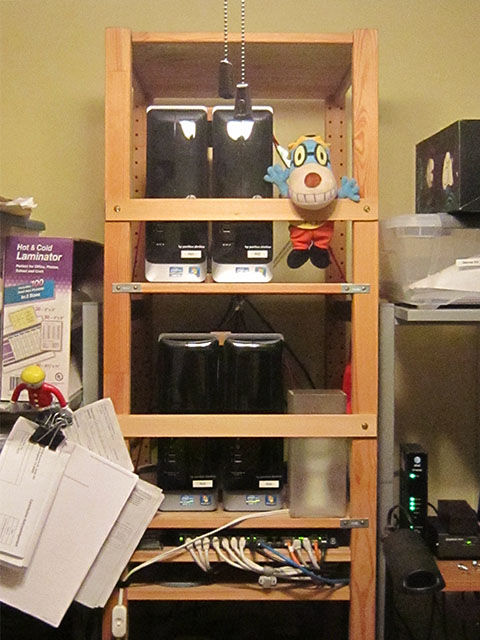
The replacement USB 3 cards I ordered should be the proper fit and type for our render farm cases. These computers are pretty small: we have four HP Slimline computers as our 'render-only' boxes. A few years ago we got a great deal on these computers plus the Slimline's small form factor and quiet/cool performance made it ideal for our tiny home studio--unlike the deafening 'jet engine' roar and heat of our old render boxes, which was hellish during the summer months. For rendering purposes. these tiny boxes are actually much faster than my workstation, and soon they'll serve double duty as our 'mocap farm'. The only downside with the Slimline boxes has been that you need to find very small parts for this model. (Thus the issue with the USB 3 cards we have now.)

Here's a pic of our farm. And, yes, our rack is a modified Ivar assembly from Ikea, complete with earthquake anchors. :)

Attachment:
RenderFarm.jpg
RenderFarm.jpg [ 94.41 KiB | Viewed 35721 times ]


Originally, we wanted to put six of these small computers on these sections of the rack--with our old computers, we could barely squeeze in four. (Our three larger workstations are on the bottom two shelves off camera.) But if we ever need to upgrade our farm again (hopefully not for a long time), we'll probably go with even fewer boxes with more core processors instead...that or start using a third party render service.

Anyway, assuming the new USB 3 cards do fit, we should be back on track for tests tomorrow or Monday evening.

G.

_________________
Greenlaw
Artist/Partner - Little Green Dog | My Demo Reels (2013,) (2015,) (2017,) and (2019)
Image
Watch a one minute excerpt on Vimeo now!


Top
 Profile  
 
PostPosted: Sun Sep 06, 2015 10:23 am 

Joined: Thu Sep 04, 2014 9:47 am
Posts: 897
Location: Florida USA
...

Oh ok, I couldn't see the version on the box well, I looked at the "long style" card, guess your were still "short style" PCI-e.

GEEZE! wth is with the cost for 33 ft. 3.0 repeater cables!

A 33 ft. cable costing almost as much as the camera is ridiculous! (bought my cam used through a trusted source cheaper).

Cheaper to buy 2x - 16ft. if can get free shipped, makes no sense.

Cable Matters had good pricing if interested: http://www.amazon.com/gp/product/B00DMFB5OK (5m and 10m)

Still cheaper there to buy it 5m x how much length than 10m x length needed, but it does hit Amazons $35 free ship min. (I want 3 so cheaper for 5m x 3).

A few bucks cheaper is still a few bucks :P

...


Top
 Profile  
 
PostPosted: Sun Sep 06, 2015 11:23 am 

Joined: Mon Aug 03, 2009 1:34 pm
Posts: 2423
Location: Los Angeles
I'm not sure where you're seeing the prices but these cables really are not that expensive--about $35 each. I had purchased 4 x Cable Matters 33 ft USB 3 repeater cables and they seem exceptionally well made. The material is 'heavy duty' with a separate aux power connection at the head...just in case you need even more power than what the card can provide without its own aux power. This shouldn't be necessary for Kinect v2 but we'll use the cables for other tasks. (We do more than just animation projects around here.) If you shop around, you can get cables cheaper but you'll probably get what you pay for. A few months ago, I purchased a cheaper USB 3.0 repeater cable for another project and it didn't work very well because it didn't sustain power as consistently as a well made cable. Lesson learned: Don't cheap out too much on cables. :)

My old USB 2.0 repeaters cost about $15 each but they were only 16 ft long. At the time (maybe 4 - 5 years ago, back when iPi Soft was recommending Logitech webcams), these were considered kind of expensive but they worked great. I still use these cables for Kinect for Windows v1 recording. I had to daisy chain two separate sets to reach the two v1 sensors on the far side of the room, so the new 33 ft cables should be just right for the v2 sensors without daisy chaining.

To get free shipping we've been using Amazon Prime for many years (long before it was a streaming video service.) We need to purchase a lot of books and computer gear every year, so Prime has been worth it for us...and we don't even use their streaming service. :p

G.

P.S., I just got the tracking info for the new USB 3 cards and because of the holiday, it looks like I won't see them till Wednesday. Testing will have to wait till next weekend.

_________________
Greenlaw
Artist/Partner - Little Green Dog | My Demo Reels (2013,) (2015,) (2017,) and (2019)
Image
Watch a one minute excerpt on Vimeo now!


Last edited by Greenlaw on Sun Sep 06, 2015 12:27 pm, edited 2 times in total.

Top
 Profile  
 
Display posts from previous:  Sort by  
Post a new topicPost a reply Page 3 of 13   [ 124 posts ]
Go to page Previous  1, 2, 3, 4, 5, 6 ... 13  Next


Who is online

Users browsing this forum: No registered users and 44 guests


You cannot post new topics in this forum
You cannot reply to topics in this forum
You cannot edit your posts in this forum
You cannot delete your posts in this forum
You cannot post attachments in this forum

Search for:
Jump to:  


Powered by phpBB® Forum Software © phpBB Group
610nm Style by Daniel St. Jules of Gamexe.net
