Change font size
It is currently Tue Aug 25, 2026 2:54 am


Post a new topicPost a reply Page 2 of 3   [ 23 posts ]
Go to page Previous  1, 2, 3  Next
Author Message
PostPosted: Sat Mar 26, 2016 2:23 pm 

Joined: Mon Aug 03, 2009 1:34 pm
Posts: 2423
Location: Los Angeles
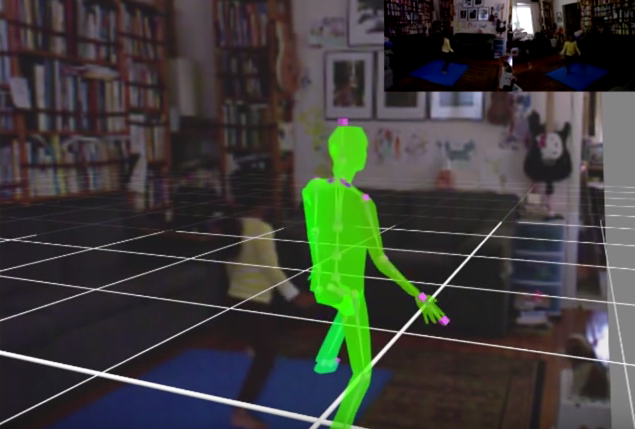
You could display RGB as a PIP or as a backdrop as far back at DMC 1.0. Here's an old video that shows this: https://www.youtube.com/watch?v=PJZabVZqCl0

Attachment:
2016-03-26_143757.png
2016-03-26_143757.png [ 418.47 KiB | Viewed 25722 times ]


I'm not sure if I was using Kinect 360 or Kinect for Windows (1.0) back then. I'm guessing this was 360 since it was captured using one of the earliest releases of iPi DMC with Kinect support. Yes, now that I recall we made Happy Box using iPi DMC 1.0 and dual Kinect 360 sensors. I don't think we upgraded to using Kinect for Windows (1.0) until we started working on the music video and using Mocap Studio 2.0.

One other useful feature for RGB capture was being able to see what the live hands were actually doing during capture--the video as seen from multiple angles was excellent reference for posing the cg hands. Of course, once I started using Move Controllers, the visual hand reference wasn't no longer useful.

I think it was version 2.0 that introduced projecting the RGB video onto the geometry. I'm not sure this has been very useful but it sure looks neat. I guess it does help a little for identifying orientation of the head and torso.

G.

_________________
Greenlaw
Artist/Partner - Little Green Dog | My Demo Reels (2013,) (2015,) (2017,) and (2019)
Image
Watch a one minute excerpt on Vimeo now!


Last edited by Greenlaw on Sat Mar 26, 2016 2:41 pm, edited 1 time in total.

Top
 Profile  
 
PostPosted: Sat Mar 26, 2016 2:41 pm 

Joined: Thu Sep 04, 2014 9:47 am
Posts: 897
Location: Florida USA
...

Oh, I'm sorry I said pic-n-pic display in Studio 2, I meant to say in Recorder 2 for recording, meaning it didn't display depth and color in its own smaller view port side by side.

I see you show it, but I could never get it to record 2-Kinect 360 using depth and color, both would just freeze up as soon as recorder was opened.

I really never worried with it much and it didn't bother me, since the RGB had nothing to do with the tracking and I didn't use them long anyway.

I was using one of each 1-360 and 1-Kinect for Windows, but come to think about it, I was using one of my front USB 3.0 ports and one rear 3.0 port that could have been on the same controller, if only one Kinect would run per controller, and can't remember if I even tried switching to a different rear 3.0 port to check if that was the issue, that is before I got the additional Renesas 3.0 controller added on.

...


Last edited by Snapz on Sat Mar 26, 2016 3:00 pm, edited 3 times in total.

Top
 Profile  
 
PostPosted: Sat Mar 26, 2016 2:47 pm 

Joined: Mon Aug 03, 2009 1:34 pm
Posts: 2423
Location: Los Angeles
Recorder could show either. You could make the RGB primary and the Depth secondary, vice versa, or only show RGB or only Depth, and it did show this for both devices simultaneously. From what I recall, this worked for either 360 or K4W 1.0. The only real difference was that the K4W UI in Recorder gave you several video specific controls for adjusting the quality of the RGB; I don't think 360 offered any options for RGB quality probably because it was never officially supported for the PC by Microsoft.

_________________
Greenlaw
Artist/Partner - Little Green Dog | My Demo Reels (2013,) (2015,) (2017,) and (2019)
Image
Watch a one minute excerpt on Vimeo now!


Top
 Profile  
 
PostPosted: Sat Mar 26, 2016 2:59 pm 

Joined: Mon Aug 03, 2009 1:34 pm
Posts: 2423
Location: Los Angeles
Snapz wrote:
I really never worried with it much and it didn't bother me, since the RGB had nothing to do with the tracking and I didn't use them long anyway.

Yes, that's true. it's necessary only if you want to use light tracking for Kinect calibration, but I don't think it does anything for body tracking. At one time it was mentioned that they might be able to use the RGB video to improve head tracking but I don't think this was actually implemented. It probably wasn't needed since the Move Controller for head tracking works quite well.

_________________
Greenlaw
Artist/Partner - Little Green Dog | My Demo Reels (2013,) (2015,) (2017,) and (2019)
Image
Watch a one minute excerpt on Vimeo now!


Top
 Profile  
 
PostPosted: Sat Mar 26, 2016 3:06 pm 

Joined: Thu Sep 04, 2014 9:47 am
Posts: 897
Location: Florida USA
...

That's good to know for Kinect v1 users, I think I read you can only calibrate 3-4 Kinects now using the light method, the program won't allow the cardboard method over 2 Kinects?, I can't try anyway, but good info for those that do, they will need RBG working correctly for that.

...


Top
 Profile  
 
PostPosted: Sat Mar 26, 2016 3:14 pm 

Joined: Mon Aug 03, 2009 1:34 pm
Posts: 2423
Location: Los Angeles
That's right, you need to use the light method for three or more sensors. You can use either the plane or light method for two sensors.

The light sensors method is supposed to be more accurate but the plane method doesn't require RGB data so it's easier to record if you're system can't handle recording both Depth and RGB data. I've found that the plane method actually works really well once you get a good pattern worked out for calibration.

Nowadays, I usually use the light method unless I need to record during the day--the plane method works better for me during the day because the brightness of the daylight in the room seems to interfere with light tracking. (Our living room gets very bright in the day even when the blinds are closed.)

G.

_________________
Greenlaw
Artist/Partner - Little Green Dog | My Demo Reels (2013,) (2015,) (2017,) and (2019)
Image
Watch a one minute excerpt on Vimeo now!


Top
 Profile  
 
PostPosted: Sat Mar 26, 2016 3:23 pm 

Joined: Thu Sep 04, 2014 9:47 am
Posts: 897
Location: Florida USA
...

I guess you're now using the 2 or more Kv2 now huh, or is it just as easy for you to use the Kv1's still? and if use 3 or 4 Kv1's I guess you record more in the evenings anyway, if light marker is your only choice now.

Good info though, you have the most experience I have read in the forum having to do with the multiple Kinects :)

Wondering how you are getting along with the Kv2's now?

...


Top
 Profile  
 
PostPosted: Sat Mar 26, 2016 6:52 pm 

Joined: Mon Aug 03, 2009 1:34 pm
Posts: 2423
Location: Los Angeles
Currently, I'm using two XBox One Kinects and three PS Move Controllers, one for each hand and one for the head. My initial tests from a couple of months ago were successful, once I figured out which computers I can use them with but I haven't done any notable capture tests for a while.

I originally wanted to get four Kinect One sensors running using the four render boxes on our home network but I couldn't get a Kinect One to work reliably with any of the render boxes. My guess is that the USB 3.0 controllers I got were not really compatible, or the motherboards in these computers are too old. I know the cables I got for the render boxes didn't work reliably but I still had issues even after switching to a set that I knew worked. I replaced the controllers with a different model, which worked better but the frame rate was unsuitable.

In the end, I got two Kinect One sensors working reliably using my personal workstation (which has been my primary iPi Mocap Studio computer since back when I was using PS3 Eye cameras, and later with Kinect for Windows (1.0) sensors) and a Wacom Cintiq Companion 2 tablet computer. Surprisingly, the tablet computer handles Kinect One data better than my workstation. This is probably because the Wacom has a more recent motherboard.

I also got a Kinect One running with my daughter's laptop but sadly she wasn't willing to part with it. Kinect One also worked with my wife's workstation but she doesn't like me tinkering with her computer either. Ah, well...guess I can't blame them. They've seen me tear apart my own gear time and time again.

Today I decided to give the render boxes another go. The USB cards I purchased before were really cheap off-brands so that may have been an issue. This morning I ordered two different USB controllers. One was another cheap off-brand and the other is a bit more expensive SIIG model that's reportedly compatible with the Kinect One. In a few days, I'll see if either of these work with the render boxes. If one does, I'll get additional new controllers for the other render boxes, and try again to get four Kinect One sensors running on our network. If not, well, then I have two 'back up' Kinects handy.

Ultimately, I'd like to get a new workstation--my current one is at least five years old and it's getting a bit creaky for this kind of work. I'm hoping that iPi Soft will be able to get that third party driver working with Mocap Studio so I can plug at least two sensors into this 'future' computer. I'm not sure when and if that will ever happen though. I know I won't have the money saved for a new computer till maybe the end of the year so this is a long-term plan anyway.

Realistically speaking, the two Kinect One sensors I have running now are all I really need to finish the Brudders music video, and to animate our next iPi mocap film. My understanding is that more Kinect One sensors won't necessarily give you higher quality mocap but it should allow you to record multiple actors with Kinect. I don't really need that capability for the music video but I wanted to try it out for possible future projects.

Lately, I haven't been able to run tests with the dual Kinect One system because I was focused on getting our new website up and running. Now that that's finally out of the way, I'm back to working with Mocap Studio. I'm hoping to have new tests using the dual Kinect One system with Mocap Studio and Webanimate by the end of the weekend.

As soon as I have anything new to report, I post the info in a new thread, at new our website, or both. :)

G.

_________________
Greenlaw
Artist/Partner - Little Green Dog | My Demo Reels (2013,) (2015,) (2017,) and (2019)
Image
Watch a one minute excerpt on Vimeo now!


Top
 Profile  
 
PostPosted: Sat Mar 26, 2016 8:09 pm 

Joined: Thu Sep 04, 2014 9:47 am
Posts: 897
Location: Florida USA
...

Well, I hope the new controllers do work, but usually if the motherboard won't handle the bandwidth, the 5Gb/s transfer rate of the USB 3.0 controller won't happen anyway.

I would probably agree that 2-Kinect 2s would give plenty of usable data for you, at least until you can get 3 or 4 up and running to see, and I would agree better data than 2-Kinect 1s, probably even 3.

Good Luck with it, I will be looking out for your posts on progress.

...


Top
 Profile  
 
PostPosted: Sat Mar 26, 2016 11:12 pm 

Joined: Mon Aug 03, 2009 1:34 pm
Posts: 2423
Location: Los Angeles
But that's just it, I don't know if it's the motherboard. The render boxes are actually newer systems than my workstation and my workstation can obviously handle the Kinect One. At this stage, the current USB controller--a very cheap 'no-brand' model--is more suspect to me at this stage.

Since one of the cards I ordered today is known to work with Kinect One, if the Kinect One still doesn't work after installing it in one of the render boxes, then I'll know that it's the motherboard. At that point, I'll give up on trying to get the render boxes to work with Kinect One and just continue to use the render boxes for what they were designed to do.

I'll let you know how it goes. Either way, I'll compile a list of everything that does and doesn't work. :)

G.

_________________
Greenlaw
Artist/Partner - Little Green Dog | My Demo Reels (2013,) (2015,) (2017,) and (2019)
Image
Watch a one minute excerpt on Vimeo now!


Top
 Profile  
 
Display posts from previous:  Sort by  
Post a new topicPost a reply Page 2 of 3   [ 23 posts ]
Go to page Previous  1, 2, 3  Next


Who is online

Users browsing this forum: Google [Bot] and 20 guests


You cannot post new topics in this forum
You cannot reply to topics in this forum
You cannot edit your posts in this forum
You cannot delete your posts in this forum
You cannot post attachments in this forum

Search for:
Jump to:  


Powered by phpBB® Forum Software © phpBB Group
610nm Style by Daniel St. Jules of Gamexe.net