A week late but FINALLY I found time to work with the dual KinectOne sensors.
First, a few more technical issues had to be sorted out and solved.
I discovered that the extra long USB 3.0 repeater cables from Cable Matters are crap. I suspected as much a few weeks ago but only got to really test them today. When connected, absolutely nothing comes through. There is a 5v tap on one end so I connected a power supply to it but still nothing. That power should not be necessary though since the USB card is already tapping the computer's power supply. After going through all four cables, only one cable just sort of worked but it did not have enough throughput. Even though the cables are marked USB 3.0, they seem to barely support USB 2.0 bandwidth. I should have known better since these were super cheap cables. Oh, well...as they say, "Penny-wise, pound-foolish." Just a word of warning.
Fortunately, I have two sets of a6ft USB 3.0 repeater cables from MonoPrice which work like they're supposed to. I also have 16ft USB 3.0 repeater cables from Cable Matters and these work fine too--it's just the extra long ones from Cable Matters that are poorly made.
@Snapz, I tried the BT adapter in a USB 3.0 port and it did work fine but you are correct about this connection not persisting. When I rebooted the computer, the PS Move Controllers did not automatically reconnect. When I moved the adapter back to the USB 2.0 port, they reconnected automatically again without having to reload the drivers manually. So I think the safest thing when using MotioninJoy is to always use the BT adapter for the PS Move Controllers with USB 2.0.
I was a little concerned about the workstation because it just barely sustains 30 fps. The stream is fairly steady when I disable RGB but still occasionally dips to 29.09 or .08. That's a pretty small error but it was a little concerning because my tablet computer never dips below 30 fps. (Oddly enough, it sometimes pushes 30.1 fps.) But when actually recording with the devices, this didn't seem to matter--neither computer dropped any frames.
(Man, I really do need to start saving for a newer computer. It's sad when a modern
tablet computer can beat out my main
workstation.)
I did run into one problem which put a stop to my session this afternoon. This was mentioned earlier (perhaps in this thread by Snapz?) but Mocap Studio seems to get confused about the location of the sensors and places them both in the same position. To illustrate, here's a screen cap of the calibration result:
Attachment:
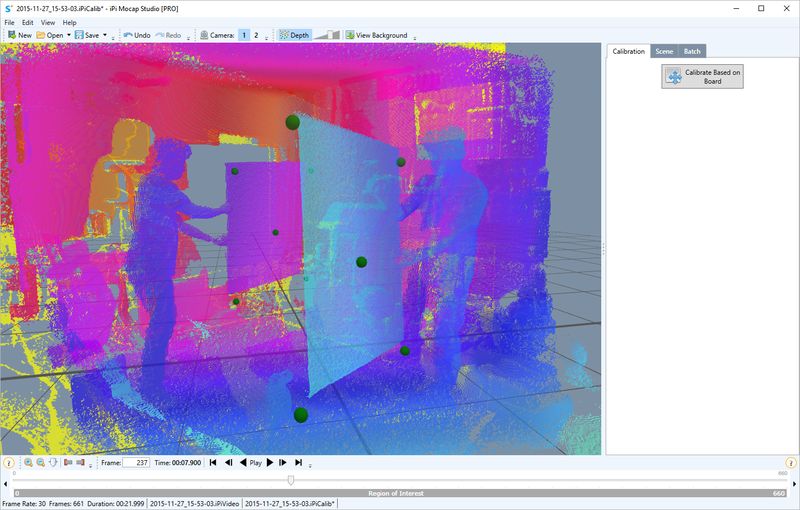 2015-11-27_163446.jpg [ 76.65 KiB | Viewed 40769 times ]
I remember seeing this error a long time ago with multi-Kinect (v1) so it was surprising to see it return with multi-KinectOne (v2).
I'll revisit this later tonight and see if I can figure out the problem.
Anyway, getting closer. :)
As soon as I can get this working properly, I'll post my thoughts about using multiple KinectOne (v2) vs multiple Kinect (v1).
G.


