Change font size
It is currently Tue Jun 30, 2026 9:56 pm


Post a new topicPost a reply Page 11 of 13   [ 124 posts ]
Go to page Previous  1 ... 8, 9, 10, 11, 12, 13  Next
Author Message
PostPosted: Tue Nov 17, 2015 2:46 pm 

Joined: Mon Aug 03, 2009 1:34 pm
Posts: 2423
Location: Los Angeles
Snapz wrote:
... that's why I now use the cable to get it away from the machine and closer to the performance area, now I don't get that issue, good tip.


Yes, that's what I've always done. You can get interference from not only the computer but also the monitor and generally any large appliance like a TV, so you want to get the BT adapter away from that if possible. The one catch is that when you're calibrating the Move controller, ideally you want to do that in your performance space near the adapter too. That's where having a laptop or tablet with TeamViewer comes in handy.

Quote:
The Kv2 draws just about every ounce of the bandwidth when started up and stores it, so no other device can draw much, and if the cam can't draw enough, it will cause drop out freezing. (My experience).


Yes, having started out with the old Logitech cameras for iPi Desktop Motion Capture 1.0 back in the early pre-release days, I know all about having to be bandwidth conscious. It got much better after the new file format was created but even after all these years, I'm still looking for ways to squeeze out as much performance as possible. :)

G.

_________________
Greenlaw
Artist/Partner - Little Green Dog | My Demo Reels (2013,) (2015,) (2017,) and (2019)
Image
Watch a one minute excerpt on Vimeo now!


Top
 Profile  
 
PostPosted: Wed Nov 18, 2015 11:43 pm 

Joined: Mon Aug 03, 2009 1:34 pm
Posts: 2423
Location: Los Angeles
Now that I have the Move Controller issue worked out, I checked on the Kinect v2 tonight. On my main workstation I noticed that it was struggling to stay above 29 fps...not good.

I noticed there was a driver update available for my nvidia card and I allowed it to run. After it was done, the Kinect had absolutely no trouble maintaining the full 30 fps. Lately it seems like driver updates are solving all my problems. Just an FYI for anybody else seeing that issue.

Anyway, it looks like I'm all set to run full-dual and possibly triple-Kinect v2 tests this weekend.

_________________
Greenlaw
Artist/Partner - Little Green Dog | My Demo Reels (2013,) (2015,) (2017,) and (2019)
Image
Watch a one minute excerpt on Vimeo now!


Top
 Profile  
 
PostPosted: Thu Nov 19, 2015 7:07 am 

Joined: Thu Sep 04, 2014 9:47 am
Posts: 897
Location: Florida USA
...

Good to hear, I hope all your test go well also.

I also did the recent Nvidia update last night after the big Windows one, so will see if that helped anything with the iPi Studio processing.

Good Luck and please keep posting some of your results for other potential users, especially for the tri and quad cam set up.

...


Top
 Profile  
 
PostPosted: Thu Nov 19, 2015 10:36 am 

Joined: Mon Aug 03, 2009 1:34 pm
Posts: 2423
Location: Los Angeles
Thanks.

Sadly, after further testing last night, it looks like I'll really only be able to use dual-Kinect v2 this weekend. I can consistently record at 30 fps with my tablet and current workstation but the old workstation and the render box just can't keep up. I think the motherboards in these old computers can't fully support USB 3.0 throughput. Bummer.

That said, I'm still pretty excited about running dual-Kinect v2 tests this weekend. While I would occasionally record using the triple-Kinect v1 configuration, most of the time I used dual-Kinect v1 because it was just faster to set up and use under tight schedules. It will be interesting to directly compare my usual dual v1 capture results with dual v2 results.

Later in the evening, I looked into what it would cost to add a v2 compatible 'no frills' render box, but I've already spent too much money on this project for the year. I think instead I'll start saving for a new workstation for next year--my current workstation is over five years old, overworked and starting to get creaky. A little like me I guess. :)

G.

_________________
Greenlaw
Artist/Partner - Little Green Dog | My Demo Reels (2013,) (2015,) (2017,) and (2019)
Image
Watch a one minute excerpt on Vimeo now!


Top
 Profile  
 
PostPosted: Thu Nov 19, 2015 11:04 am 

Joined: Thu Sep 04, 2014 9:47 am
Posts: 897
Location: Florida USA
...

Tracked some recordings again with the recent Windows 10/Nvidia updates and it did increase the processing speeds a touch, and I always track with Google Chrome running and Skype open for instant communication with my contacts, but both together only draw about 3% of the CPU process.

Speed went from consistent 2.20 f/s @ .47 s/f to 2.30 @ .44 s/f ... this may not sound like much, but any bit better IS better.

Refine backwards now is up over 2.50 f/s @ .40 s/f from around 2.35 f/s

JR went up to 7.00 f/s from 6.7 s/f still at .13 s/f

Again, I always use primarily the same settings during tracking: All boxes checked, shoulders by video, very flex spine and now I only track in LOW Res.

I did find a little trick to help speeds, if I start the track forward and then hit the space bar to stop it and quickly hit the track forward button again, (hovering pointer over it), I do get a boost in top speed once it stabilizes, a noticeable difference, try it to see for yourself. Do this when ever you need to pause and restart tracking.

The good thing is these speeds are now consistent, no real fluctuation over a few 100's of a second, no matter how many times I pause to correct things during the tracking when needed, where it used to degrade a little bit from top speed each time I would have to do this, and never reach best speed again.

I don't know how others process their tracking, but I try to fix major tracking issues as they occur and then continue on, I don't batch process and fix later and I try not to use track backwards as a fix, it's better if possible to always track forward and even switch cam view to better see the error and most times it will track without error then. Once I am satisfied with the initial auto-tracking, I can then manually fix any areas I don't like easier. (I am referring to using PS Eyes, but Kinects I did the same way).

Seems to also have reached peak speed quicker, like 100 frames quicker on tracking process, but always the last bit of speed comes as it continues to run.

CPU performance seems to have went up though a bit to 60% +/- from around 50% +/- if I remember right from last check while iPi Studio was tracking.

I agree totally that the driver updates are solving many issues with Win 10 and my best update was the Network Adapter, that changed the game for me.

I am not totally sure what this recent Win 10 update has done, do see some visual changes, but don't know about over-all Windows 10 performance yet.

...


Top
 Profile  
 
PostPosted: Thu Nov 19, 2015 11:11 am 

Joined: Thu Sep 04, 2014 9:47 am
Posts: 897
Location: Florida USA
...

Really, well that's a shame, I wanted to see a few user tracked tri/quad-cam Kinects v2 trackings.

Can only do what we can do for sure.

You will see an improvement over Kv1, especially in the feet placement to ground, but just the way it is, the feet are still the major issue with the Kinects, rest of the body tracks pretty well due to the depth cloud being a bit more tighter than it was in Kv1, I believe.

Good Luck!

...


Top
 Profile  
 
PostPosted: Thu Nov 19, 2015 11:14 am 

Joined: Mon Aug 03, 2009 1:34 pm
Posts: 2423
Location: Los Angeles
Thanks for the detailed update!

Snapz wrote:
... this may not sound like much, but any bit better IS better.

I'll take any performance boost I can get. Those small numbers add up quickly, especially if you do a lot of takes and long sequences.

G.

_________________
Greenlaw
Artist/Partner - Little Green Dog | My Demo Reels (2013,) (2015,) (2017,) and (2019)
Image
Watch a one minute excerpt on Vimeo now!


Top
 Profile  
 
PostPosted: Thu Nov 19, 2015 11:21 am 

Joined: Thu Sep 04, 2014 9:47 am
Posts: 897
Location: Florida USA
...

Sure do!

I am talking from when I was using the GTX 750 Ti taking over 35 mins to track a 30 sec recording, to now with this GTX 970 FTW taking under 12 minutes, this is just for track forwarding process time, but over-all until ready to export the animation, I am able to get there in under 1/2 the time and that's what I was really looking for.

Just as a side note: If you are tracking actions with takes that are really short, (5 secs or so), you may never hit full processing speeds capable anyway, as it takes time to fully build and maintain speed, but at that short of a take, max speed isn't really needed anyway, it just depends on your specific machines capabilities for longer, more complex takes to process quickly.

Also, I meant to mention this for Nvidia card users:

In the Nvidia Control Panel/Manage 3D settings, if you dont have it added, you should add iPi Studio 3 to it.

There is a couple settings that should be changed from Global to Program specific.

1) Change the Power management mode to: Prefer High Performance. (Important)
2) Change Texture filtering quality to: High Performance. (Medium)
3) You can turn off all anti-Aliasing, not really needed in iPi Studio. (Medium)
These by choice:
4) Texture filtering tri-linear: Off
5) Threaded optimization: Off
6) Triple buffering: Off
7) Vertical sync: Off

Or, you can try variations that fit your process and machine better, these worked fine for me.

Also when you update the Nvidia drivers, it will reset these back to Standard Global, and possibly remove iPi Studio from the programs, so will need to be reset afterwards.

Just food for the head if interested.
...


Top
 Profile  
 
PostPosted: Fri Nov 20, 2015 7:08 am 

Joined: Thu Sep 04, 2014 9:47 am
Posts: 897
Location: Florida USA
...

I see in the recent update, (11/19), some things were updated for the Kv2, when you try your testing with the dual set up it would be nice to hear your review on what this consists of, there is a description listed in the notes link about what it will improve, but better use of the data in iPi Studio can't be bad thing.

I guess you would really have to make a test video, then track each before and after to compare.

Possibly it corrected the depth video only alignment mismatch I was experiencing on the actor to performer depth cloud in the studio, maybe better floor recognition height.

It would be helpful to hear anyones impressions after getting a chance to record and track some things.

...


Top
 Profile  
 
PostPosted: Fri Nov 27, 2015 7:08 pm 

Joined: Mon Aug 03, 2009 1:34 pm
Posts: 2423
Location: Los Angeles
A week late but FINALLY I found time to work with the dual KinectOne sensors.

First, a few more technical issues had to be sorted out and solved.

I discovered that the extra long USB 3.0 repeater cables from Cable Matters are crap. I suspected as much a few weeks ago but only got to really test them today. When connected, absolutely nothing comes through. There is a 5v tap on one end so I connected a power supply to it but still nothing. That power should not be necessary though since the USB card is already tapping the computer's power supply. After going through all four cables, only one cable just sort of worked but it did not have enough throughput. Even though the cables are marked USB 3.0, they seem to barely support USB 2.0 bandwidth. I should have known better since these were super cheap cables. Oh, well...as they say, "Penny-wise, pound-foolish." Just a word of warning.

Fortunately, I have two sets of a6ft USB 3.0 repeater cables from MonoPrice which work like they're supposed to. I also have 16ft USB 3.0 repeater cables from Cable Matters and these work fine too--it's just the extra long ones from Cable Matters that are poorly made.

@Snapz, I tried the BT adapter in a USB 3.0 port and it did work fine but you are correct about this connection not persisting. When I rebooted the computer, the PS Move Controllers did not automatically reconnect. When I moved the adapter back to the USB 2.0 port, they reconnected automatically again without having to reload the drivers manually. So I think the safest thing when using MotioninJoy is to always use the BT adapter for the PS Move Controllers with USB 2.0.

I was a little concerned about the workstation because it just barely sustains 30 fps. The stream is fairly steady when I disable RGB but still occasionally dips to 29.09 or .08. That's a pretty small error but it was a little concerning because my tablet computer never dips below 30 fps. (Oddly enough, it sometimes pushes 30.1 fps.) But when actually recording with the devices, this didn't seem to matter--neither computer dropped any frames.

(Man, I really do need to start saving for a newer computer. It's sad when a modern tablet computer can beat out my main workstation.)

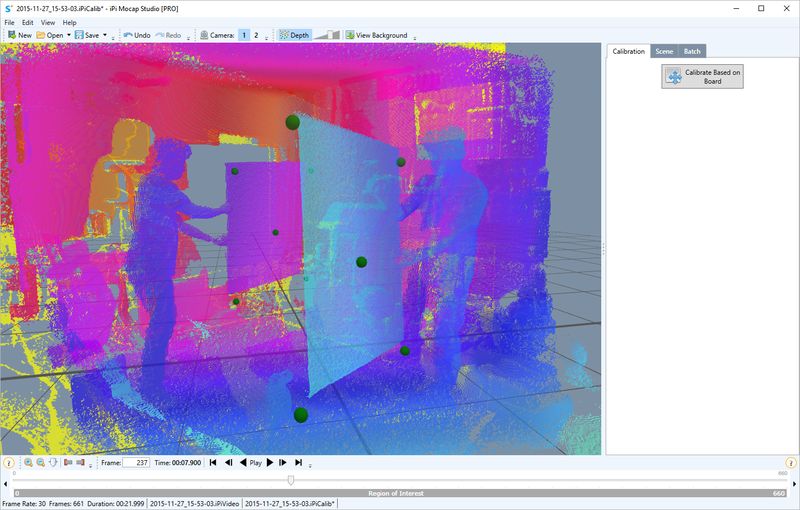
I did run into one problem which put a stop to my session this afternoon. This was mentioned earlier (perhaps in this thread by Snapz?) but Mocap Studio seems to get confused about the location of the sensors and places them both in the same position. To illustrate, here's a screen cap of the calibration result:

Attachment:
2015-11-27_163446.jpg
2015-11-27_163446.jpg [ 76.65 KiB | Viewed 36443 times ]

I remember seeing this error a long time ago with multi-Kinect (v1) so it was surprising to see it return with multi-KinectOne (v2).

I'll revisit this later tonight and see if I can figure out the problem.

Anyway, getting closer. :)

As soon as I can get this working properly, I'll post my thoughts about using multiple KinectOne (v2) vs multiple Kinect (v1).

G.

_________________
Greenlaw
Artist/Partner - Little Green Dog | My Demo Reels (2013,) (2015,) (2017,) and (2019)
Image
Watch a one minute excerpt on Vimeo now!


Top
 Profile  
 
Display posts from previous:  Sort by  
Post a new topicPost a reply Page 11 of 13   [ 124 posts ]
Go to page Previous  1 ... 8, 9, 10, 11, 12, 13  Next


Who is online

Users browsing this forum: No registered users and 4 guests


You cannot post new topics in this forum
You cannot reply to topics in this forum
You cannot edit your posts in this forum
You cannot delete your posts in this forum
You cannot post attachments in this forum

Search for:
Jump to:  


Powered by phpBB® Forum Software © phpBB Group
610nm Style by Daniel St. Jules of Gamexe.net
